Bacula Client Behind NAT Support with the Connect To Director Directive

Bacula Client Behind NAT Support with the Connect To Director Directive

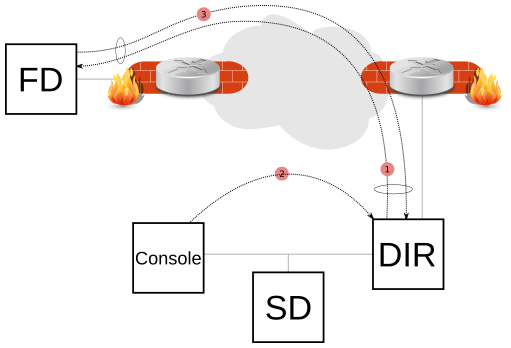
A Client can now initiate a connection to the Director (permanently or scheduled) to let the Director connect back when a new Job is started or a bconsole command such as status client or estimate is issued.

This new network configuration option is particularly useful for Clients that are not directly reachable by the Director.

Behind NAT Client Example

# cat /opt/bacula/etc/bacula-fd.conf
Director {
  Name = bac-dir
  Password = aigh3wu7oothieb4geeph3noo  # Password used to connect

  # New directives
  Address = bac-dir.mycompany.com       # Director address to connect
  Connect To Director = yes                  # FD will call the Director
}


# cat /opt/bacula/etc/bacula-dir.conf
Client {
  Name = bac-fd
  Password = aigh3wu7oothieb4geeph3noo

  # New directive
  Allow FD Connections = yes
}

Attention! The Client name in the Director’s configuration must be exactly the same as the one configured in bacula-fd.conf.

It is possible to schedule the Client connenction to certain periods of the day:

# cat /opt/bacula/etc/bacula-fd.conf
Director {
  Name = bac-dir
  Password = aigh3wu7oothieb4geeph3noo  # Password used to connect

  # New directives
  Address = bac-dir.mycompany.com       # Director address to connect
  Connect To Director = yes             # FD will call the Director
  Schedule = WorkingHours
}

Schedule {
  Name = WorkingHours
  # Connect the Director between 12:00 and 14:00
  Connect = MaxConnectTime=2h on mon-fri at 12:00
}

Note that in the current version, if the File Daemon is started after 12:00, the next connection to the Director will occur at 12:00 the next day.

A Job can be scheduled in the Director around 12:00, and if the Client is connected, the Job will be executed as if the Client was reachable from the Director.

Leave a Reply

Cliente Bacula Atrás de NAT com a diretiva Connect To Director

Cliente Bacula Atrás de NAT com a diretiva Connect To Director

Um Cliente pode agora iniciar uma conexão com o Diretor (permanentemente ou programada) para permitir que o Diretor se conecte novamente quando um novo Job for iniciado ou um comando bconsole (ex.: status cliente) for emitido.

Essa nova opção de configuração de rede é particularmente útil para clientes que não podem ser acessados diretamente pelo diretor.

Exemplo Conexão Atrás de NAT

# cat /opt/bacula/etc/bacula-fd.conf
Director {
  Name = bac-dir
  Password = aigh3wu7oothieb4geeph3noo  # Password used to connect

  # New directives
  Address = bac-dir.mycompany.com       # Director address to connect
  Connect To Director = yes                  # FD will call the Director
}


# cat /opt/bacula/etc/bacula-dir.conf
Client {
  Name = bac-fd
  Password = aigh3wu7oothieb4geeph3noo

  # New directive
  Allow FD Connections = yes
}

Atenção! O nome do Client na configuração do Director precisa ser exatamente igual ao configurado no bacula-fd.conf.

É possível agendar a conexão do Cliente para determinados períodos do dia:

# cat /opt/bacula/etc/bacula-fd.conf
Director {
  Name = bac-dir
  Password = aigh3wu7oothieb4geeph3noo  # Password used to connect

  # New directives
  Address = bac-dir.mycompany.com       # Director address to connect
  Connect To Director = yes             # FD will call the Director
  Schedule = WorkingHours
}

Schedule {
  Name = WorkingHours
  # Connect the Director between 12:00 and 14:00
  Connect = MaxConnectTime=2h on mon-fri at 12:00
}

Observe que, na versão atual, se o File Daemon for iniciado após as 12:00, a próxima conexão com o Director ocorrerá às 12:00 do dia seguinte.

Um trabalho pode ser agendado no diretor por volta das 12:00, e se o cliente estiver conectado, o trabalho será executado como se o cliente fosse acessado pelo diretor.


Leave a Reply

Cliente Bacula Detrás de NAT con Connect To Director

Cliente Bacula Detrás de NAT con Connect To Director

Ahora un Cliente puede iniciar una conexión con el Director (de forma permanente o programada) para permitir que el Director vuelva a conectarse cuando se inicie un nuevo Trabajo o se emita un comando bconsole (por ejemplo, estado del cliente).

Esta nueva opción de configuración de red es particularmente útil para clientes a los que el principal no puede acceder directamente.

Ejemplo de Conexión Detrás de NAT

# cat /opt/bacula/etc/bacula-fd.conf
Director {
  Name = bac-dir
  Password = aigh3wu7oothieb4geeph3noo  # Password used to connect

  # New directives
  Address = bac-dir.mycompany.com       # Director address to connect
  Connect To Director = yes                  # FD will call the Director
}


# cat /opt/bacula/etc/bacula-dir.conf
Client {
  Name = bac-fd
  Password = aigh3wu7oothieb4geeph3noo

  # New directive
  Allow FD Connections = yes
}

Atencion! El nombre del Cliente en la configuración del Director debe ser exactamente el mismo que el configurado en bacula-fd.conf.

Puedes programar tu conexión para ciertas horas del día:

# cat /opt/bacula/etc/bacula-fd.conf
Director {
  Name = bac-dir
  Password = aigh3wu7oothieb4geeph3noo  # Password used to connect

  # New directives
  Address = bac-dir.mycompany.com       # Director address to connect
  Connect To Director = yes             # FD will call the Director
  Schedule = WorkingHours
}

Schedule {
  Name = WorkingHours
  # Connect the Director between 12:00 and 14:00
  Connect = MaxConnectTime=2h on mon-fri at 12:00
}

Tenga en cuenta que en la versión actual, si el Demonio de archivos se inicia después de las 12:00, la próxima conexión con el Director se realizará a las 12:00 del día siguiente.

Se puede programar un trabajo en el director para las 12:00, y si el cliente está conectado, el trabajo se ejecutará como si el director hubiera accedido al cliente.


Leave a Reply