Bacula e Prototoclo BBR para Backups via Internet, Perdas de Pacotes, Desconexões etc.

Bacula e Prototoclo BBR para Backups via Internet, Perdas de Pacotes, Desconexões etc.

Backups através de redes degradadas (ex.: com perdas de pacotes) e Internet, na qual a conexão passa por diversos NATs, firewalls e roteadores, tendem a afetar bastante a performance e resiliência de conexões TCP. Erros como os que seguem podem acontecer no Bacula.

2023-04-20 21:03:38 ocspbacprdap02-sd JobId 11052: Fatal error: append.c:175 Error reading data header from FD. n=-2 msglen=20 ERR=I/O Error
2023-04-20 21:03:38 ocspbacprdap02-sd JobId 11052: Error: bsock.c:395 Wrote 23 bytes to client:10.16.152.200:9103, but only 0 accepted.

#or

02-Aug 09:13 backupserver-dir JobId 110334: Fatal error: Network error with FD during Backup: ERR=Connection reset by peer

O uso do protocolo de congestão BBR nas máquinas do Director, Storage e File Daemons Linux do Bacula melhora significativa a resiliência para esses erros. o tempo de resposta e desempenho da rede também são aprimorados, na medida quer desconexões e perdas de pacote afetam muito menos as taxas de transferência.

O que é BBR?

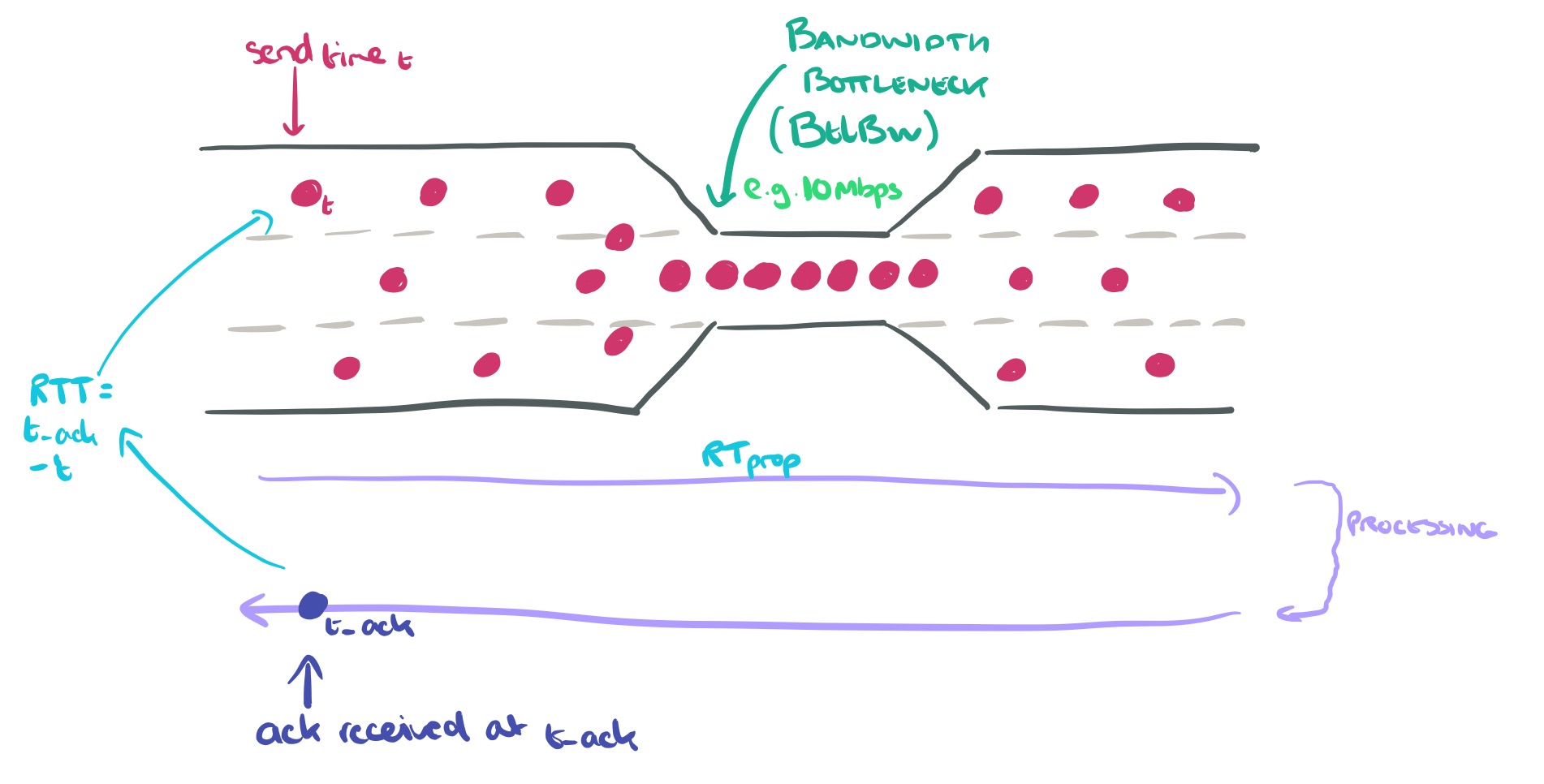
BBR é uma sigla para “Bottleneck Bandwidth and RTT” (Largura de Banda do Estrangulamento e Tempo de Resposta). O controle de congestão BBR calcula a taxa de envio com base na taxa de entrega (throughput) estimada a partir dos ACKs.

O BBR foi contribuído para o kernel Linux 4.9 em 2016 pelo Google.

O BBR aumentou significativamente o throughput e reduziu a latência para conexões nas redes internas da Google, bem como para os servidores da Web google.com e YouTube.

O BBR requer apenas alterações no lado do remetente, sem necessidade de mudanças na rede ou no lado do receptor. Portanto, ele pode ser implantado de forma incremental na Internet atual ou em data centers.

Como ativar o BBR

O script a seguir do Shell deve implementar o BBR.

modprobe tcp_bbr
echo "tcp_bbr" > /etc/modules-load.d/bbr.conf
echo "net.ipv4.tcp_congestion_control = bbr
net.core.default_qdisc = fq" >> /etc/sysctl.conf
sudo sysctl -p
sysctl net.ipv4.tcp_congestion_control

Se o último comando deve exibir na tela o protocolo bbr, como a seguir.

root@hfaria-P65:~# sysctl net.ipv4.tcp_congestion_control
net.ipv4.tcp_congestion_control = bbr

Caso outro protocolo seja exibido, reinicie o servidor.

Como testar o desempenho de rede?

iperf3 é uma utilidade para realizar testes de throughput de rede.

$ sudo apt-get install -y iperf3

Reading package lists... Done
Building dependency tree
Reading state information... Done
The following additional packages will be installed:
  libiperf0 libsctp1
Suggested packages:
  lksctp-tools
The following NEW packages will be installed:
  iperf3 libiperf0 libsctp1
...

iperf3 pode usar a opção -C (ou –congestion) para escolher o algoritmo de controle de congestão. Em nossos testes, podemos especificar o BBR

-C, --congestion algo
      Set the congestion control algorithm (Linux and FreeBSD only).  An  older  --linux-congestion  synonym
      for this flag is accepted but is deprecated.

iperf -C bbr -c example.com  # replace example.com with your test target

Nota:
O BBR TCP é apenas do lado do remetente, portanto, você não precisa se preocupar se o receptor suporta o BBR. Observe que o BBR é muito mais eficaz quando se utiliza o FQ (fair queuing) para ajustar o ritmo dos pacotes para, no máximo, 90% da taxa de linha.

Como posso monitorar as conexões TCP BBR no Linux?

Você pode usar o ss (outra utilidade para investigar sockets) para monitorar as variáveis de estado do BBR, incluindo a taxa de pacing, cwnd, estimativa de largura de banda, estimativa de min_rtt, etc.

Exemplo de saída do ss -tin:

$ ss -tin
State       Recv-Q       Send-Q              Local Address:Port                 Peer Address:Port        Process
ESTAB       0            36                      10.0.0.55:22                 123.23.12.98:61030
     bbr wscale:6,7 rto:292 rtt:91.891/20.196 ato:40 mss:1448 pmtu:9000 rcvmss:1448 advmss:8948 cwnd:48 bytes_sent:95301
   bytes_retrans:136 bytes_acked:95129 bytes_received:20641 segs_out:813 segs_in:1091 data_segs_out:792 data_segs_in:481
   bbr:(bw:1911880bps,mrtt:73.825,pacing_gain:2.88672,cwnd_gain:2.88672) send 6050995bps lastsnd:4 lastrcv:8 lastack:8
   pacing_rate 5463880bps delivery_rate 1911928bps delivered:791 app_limited busy:44124ms unacked:1 retrans:0/2
   dsack_dups:1 rcv_space:56576 rcv_ssthresh:56576 minrtt:73.825

Abaixo, os campos a seguir podem aparecer:

ts     show string "ts" if the timestamp option is set

sack   show string "sack" if the sack option is set

ecn    show string "ecn" if the explicit congestion notification option is set

ecnseen
        show string "ecnseen" if the saw ecn flag is found in received packets

fastopen
        show string "fastopen" if the fastopen option is set

cong_alg
        the congestion algorithm name, the default congestion algorithm is "cubic"

wscale:<snd_wscale>:<rcv_wscale>
        if window scale option is used, this field shows the send scale factor and receive scale factor

rto:<icsk_rto>
        tcp re-transmission timeout value, the unit is millisecond

backoff:<icsk_backoff>
        used for exponential backoff re-transmission,  the  actual  re-transmission  timeout  value  is
        icsk_rto << icsk_backoff

rtt:<rtt>/<rttvar>
        rtt  is  the average round trip time, rttvar is the mean deviation of rtt, their units are mil‐
        lisecond

ato:<ato>
        ack timeout, unit is millisecond, used for delay ack mode

mss:<mss>
        max segment size

cwnd:<cwnd>
        congestion window size

pmtu:<pmtu>
        path MTU value

ssthresh:<ssthresh>
        tcp congestion window slow start threshold

bytes_acked:<bytes_acked>
        bytes acked

bytes_received:<bytes_received>
        bytes received

segs_out:<segs_out>
        segments sent out

segs_in:<segs_in>
        segments received

send <send_bps>bps
        egress bps

lastsnd:<lastsnd>
        how long time since the last packet sent, the unit is millisecond

lastrcv:<lastrcv>
        how long time since the last packet received, the unit is millisecond

lastack:<lastack>
        how long time since the last ack received, the unit is millisecond

pacing_rate <pacing_rate>bps/<max_pacing_rate>bps
        the pacing rate and max pacing rate

rcv_space:<rcv_space>
        a helper variable for TCP internal auto tuning socket receive buffer

Exemplos de Melhoria de Throughput TCP

Do Google

A Pesquisa do Google e o YouTube implementaram o BBR e obtiveram melhorias no desempenho do TCP.

Aqui estão exemplos de resultados de desempenho para ilustrar a diferença entre o BBR e o CUBIC:

  • Resiliência à perda aleatória (por exemplo, devido a buffers rasos):Considere um teste netperf TCP_STREAM com duração de 30 segundos em um caminho emulado com um gargalo de 10 Gbps, RTT de 100 ms e taxa de perda de pacotes de 1%. O CUBIC obtém 3,27 Mbps, enquanto o BBR alcança 9150 Mbps (2798 vezes mais alto).
  • Baixa latência com os buffers inflados comuns nos links da última milha hoje em dia:Considere um teste netperf TCP_STREAM com duração de 120 segundos em um caminho emulado com um gargalo de 10 Mbps, RTT de 40 ms e buffer de gargalo de 1000 pacotes. Ambos utilizam totalmente a largura de banda do gargalo, mas o BBR consegue fazer isso com um RTT médio 25 vezes menor (43 ms em vez de 1,09 segund

Da AWS CloudFront

Durante março e abril de 2019, a AWS CloudFront implementou o BBR. De acordo com o blog da AWS: ‘Controle de Congestão TCP BBR com a Amazon CloudFront

O uso do BBR no CloudFront tem sido globalmente favorável, com ganhos de desempenho de até 22% de melhoria no throughput agregado em várias redes e regiões.

De Shadowsocks

Tenho um servidor Shadowsocks em execução em um Raspberry Pi. Sem o BBR, a velocidade de download do cliente é de cerca de 450 KB/s. Com o BBR, a velocidade de download do cliente melhora para 3,6 MB/s, o que é 8 vezes mais rápido do que o padrão.

BBR v2

Há um trabalho em andamento para o BBR v2, que ainda está na fase alfa.

Resolução de Problemas

sysctl: definindo a chave ‘net.core.default_qdisc’: Arquivo ou diretório não encontrado

sysctl: setting key "net.core.default_qdisc": No such file or directory

A razão é que o módulo do kernel tcp_bbr ainda não foi carregado. Para carregar o tcp_bbr, execute o seguinte comando

sudo modprobe tcp_bbr

Para verificar se o tcp_bbr está carregado, use o lsmod, por exemplo, no seguinte comando, você deverá ver a linha tcp_bbr:

$ lsmod | grep tcp_bbr
tcp_bbr                20480  3

“Se o comando sudo modprobe tcp_bbr não funcionar, reinicie o sistema

Referência

Leave a Reply

Bacula and BBR Protocol for Internet Backups, Packet Losses, Disconnections, etc.

Bacula and BBR Protocol for Internet Backups, Packet Losses, Disconnections, etc.

Backups through degraded networks (e.g., with packet loss) and the Internet, where the connection passes through various NATs, firewalls, and routers, tend to significantly affect the performance and resilience of TCP connections. Errors like the following can occur in Bacula.

2023-04-20 21:03:38 ocspbacprdap02-sd JobId 11052: Fatal error: append.c:175 Error reading data header from FD. n=-2 msglen=20 ERR=I/O Error
2023-04-20 21:03:38 ocspbacprdap02-sd JobId 11052: Error: bsock.c:395 Wrote 23 bytes to client:10.16.152.200:9103, but only 0 accepted.

#or

02-Aug 09:13 backupserver-dir JobId 110334: Fatal error: Network error with FD during Backup: ERR=Connection reset by peer

The use of the BBR congestion control protocol on the Director, Storage, and File Daemons Linux machines of Bacula significantly improves resilience to these errors. Response time and network performance are also enhanced, as disconnections and packet losses have much less impact on transfer rates.

What is BBR?

BBR is an acronym for “Bottleneck Bandwidth and RTT” (Bottleneck Bandwidth and Round-Trip Time). The BBR congestion control calculates the sending rate based on the estimated delivery rate derived from ACKs.BBR was contributed to the Linux kernel version 4.9 in 2016 by Google.

BBR significantly increased throughput and reduced latency for connections in Google’s internal networks, as well as for google.com and YouTube web servers.

BBR requires only changes on the sender’s side, with no need for changes in the network or on the receiver’s side. Therefore, it can be deployed incrementally on the current Internet or in data centers.

How to Enable BBR

The following shell script should implement BBR.

modprobe tcp_bbr
echo "tcp_bbr" > /etc/modules-load.d/bbr.conf
echo "net.ipv4.tcp_congestion_control = bbr
net.core.default_qdisc = fq" >> /etc/sysctl.conf
sudo sysctl -p
sysctl net.ipv4.tcp_congestion_control

If the last command displays the BBR protocol on the screen as follows:

root@hfaria-P65:~# sysctl net.ipv4.tcp_congestion_control
net.ipv4.tcp_congestion_control = bbr

If another protocol is displayed, restart the server.

How to Test Network Performance?

iperf3 is a utility for conducting network throughput tests.

$ sudo apt-get install -y iperf3

Reading package lists... Done
Building dependency tree
Reading state information... Done
The following additional packages will be installed:
  libiperf0 libsctp1
Suggested packages:
  lksctp-tools
The following NEW packages will be installed:
  iperf3 libiperf0 libsctp1
...

iperf3 can use the -C (or –congestion) option to choose the congestion control algorithm. In our tests, we can specify BBR as follows:

-C, --congestion algo
      Set the congestion control algorithm (Linux and FreeBSD only).  An  older  --linux-congestion  synonym
      for this flag is accepted but is deprecated.

iperf -C bbr -c example.com  # replace example.com with your test target

Note:
BBR TCP is only on the sender’s side, so you don’t need to worry if the receiver supports BBR. Note that BBR is much more effective when using FQ (fair queuing) to pace packets to no more than 90% of the line rate.

How Can I Monitor BBR TCP Connections on Linux?

You can use the ss utility (another tool for investigating sockets) to monitor BBR’s state variables, including pacing rate, cwnd, bandwidth estimate, min_rtt estimate, and more.

Example output of ss -tin:

$ ss -tin
State       Recv-Q       Send-Q              Local Address:Port                 Peer Address:Port        Process
ESTAB       0            36                      10.0.0.55:22                 123.23.12.98:61030
     bbr wscale:6,7 rto:292 rtt:91.891/20.196 ato:40 mss:1448 pmtu:9000 rcvmss:1448 advmss:8948 cwnd:48 bytes_sent:95301
   bytes_retrans:136 bytes_acked:95129 bytes_received:20641 segs_out:813 segs_in:1091 data_segs_out:792 data_segs_in:481
   bbr:(bw:1911880bps,mrtt:73.825,pacing_gain:2.88672,cwnd_gain:2.88672) send 6050995bps lastsnd:4 lastrcv:8 lastack:8
   pacing_rate 5463880bps delivery_rate 1911928bps delivered:791 app_limited busy:44124ms unacked:1 retrans:0/2
   dsack_dups:1 rcv_space:56576 rcv_ssthresh:56576 minrtt:73.825

The following fields may appear:

ts     show string "ts" if the timestamp option is set

sack   show string "sack" if the sack option is set

ecn    show string "ecn" if the explicit congestion notification option is set

ecnseen
        show string "ecnseen" if the saw ecn flag is found in received packets

fastopen
        show string "fastopen" if the fastopen option is set

cong_alg
        the congestion algorithm name, the default congestion algorithm is "cubic"

wscale:<snd_wscale>:<rcv_wscale>
        if window scale option is used, this field shows the send scale factor and receive scale factor

rto:<icsk_rto>
        tcp re-transmission timeout value, the unit is millisecond

backoff:<icsk_backoff>
        used for exponential backoff re-transmission,  the  actual  re-transmission  timeout  value  is
        icsk_rto << icsk_backoff

rtt:<rtt>/<rttvar>
        rtt  is  the average round trip time, rttvar is the mean deviation of rtt, their units are mil‐
        lisecond

ato:<ato>
        ack timeout, unit is millisecond, used for delay ack mode

mss:<mss>
        max segment size

cwnd:<cwnd>
        congestion window size

pmtu:<pmtu>
        path MTU value

ssthresh:<ssthresh>
        tcp congestion window slow start threshold

bytes_acked:<bytes_acked>
        bytes acked

bytes_received:<bytes_received>
        bytes received

segs_out:<segs_out>
        segments sent out

segs_in:<segs_in>
        segments received

send <send_bps>bps
        egress bps

lastsnd:<lastsnd>
        how long time since the last packet sent, the unit is millisecond

lastrcv:<lastrcv>
        how long time since the last packet received, the unit is millisecond

lastack:<lastack>
        how long time since the last ack received, the unit is millisecond

pacing_rate <pacing_rate>bps/<max_pacing_rate>bps
        the pacing rate and max pacing rate

rcv_space:<rcv_space>
        a helper variable for TCP internal auto tuning socket receive buffer

Examples of TCP Throughput Improvement

From Google

Google Research and YouTube implemented BBR and achieved improvements in TCP performance.

Here are performance result examples to illustrate the difference between BBR and CUBIC:

  • Resilience to random loss (e.g., due to shallow buffers): Consider a netperf TCP_STREAM test lasting 30 seconds on a path emulated with a 10 Gbps bottleneck, 100 ms RTT, and 1% packet loss rate. CUBIC achieves 3.27 Mbps, while BBR reaches 9150 Mbps (2798 times higher).
  • Low latency with common inflated buffers on last-mile links today: Consider a netperf TCP_STREAM test lasting 120 seconds on a path emulated with a 10 Mbps bottleneck, 40 ms RTT, and a buffer of 1000 packets. Both fully utilize the bottleneck bandwidth, but BBR can do so with an average RTT 25 times lower (43 ms instead of 1.09 seconds).

From AWS CloudFront

During March and April 2019, AWS CloudFront implemented BBR. According to AWS’s blog: ‘BBR TCP Congestion Control with Amazon CloudFront

BBR usage on CloudFront has been globally favorable, with performance gains of up to 22% improvement in aggregate throughput across various networks and regions.

From Shadowsocks

I have a Shadowsocks server running on a Raspberry Pi. Without BBR, the client’s download speed is about 450 KB/s. With BBR, the client’s download speed improves to 3.6 MB/s, which is 8 times faster than the default.

BBR v2

There is ongoing work on BBR v2, which is still in the alpha phase.

Troubleshooting

sysctl: setting key ‘net.core.default_qdisc’: No such file or directory

sysctl: setting key "net.core.default_qdisc": No such file or directory

The reason is that the tcp_bbr kernel module has not been loaded yet. To load tcp_bbr, execute the following command:

sudo modprobe tcp_bbr

To check if tcp_bbr is loaded, use lsmod. For example, in the following command, you should see the tcp_bbr line:

$ lsmod | grep tcp_bbr
tcp_bbr                20480  3

“If the sudo modprobe tcp_bbr command doesn’t work, restart the system.

Reference

Leave a Reply

Protocolo Bacula y BBR para Backups de Internet, Pérdidas de Paquetes, Desconexiones, etc.

Protocolo Bacula y BBR para Backups de Internet, Pérdidas de Paquetes, Desconexiones, etc.

Copias de seguridad a través de redes degradadas (por ejemplo, con pérdida de paquetes) e Internet, en las cuales la conexión pasa por varios NAT, firewalls y enrutadores, tienden a afectar significativamente el rendimiento y la resiliencia de las conexiones TCP. Errores como los que siguen pueden ocurrir en Bacula.

El uso del protocolo de congestión BBR en las máquinas de Director, Storage e File Daemons De bacula en Linux mejora significativamente la resiliencia a estos errores. También se mejoran el tiempo de respuesta y el rendimiento de la red, ya que las desconexiones y la pérdida de paquetes afectan mucho menos las tasas de transferencia.

¿Qué es BBR?

BBR es una sigla que significa “Bottleneck Bandwidth and RTT” (Ancho de Banda del Estrangulamiento y Tiempo de Respuesta). El control de congestión BBR calcula la tasa de envío basada en la tasa de entrega estimada a partir de los ACK.

BBR fue contribuido al kernel de Linux 4.9 en 2016 por Google.

BBR aumentó significativamente el rendimiento y redujo la latencia para las conexiones en las redes internas de Google, así como para los servidores web de google.com y YouTube.

BBR solo requiere cambios en el lado del remitente, sin necesidad de cambios en la red o en el lado del receptor. Por lo tanto, se puede implementar de manera incremental en Internet actual o en centros de datos.

¿Cómo activar BBR?

El siguiente script de Shell implementa BBR.

modprobe tcp_bbr
echo "tcp_bbr" > /etc/modules-load.d/bbr.conf
echo "net.ipv4.tcp_congestion_control = bbr
net.core.default_qdisc = fq" >> /etc/sysctl.conf
sudo sysctl -p
sysctl net.ipv4.tcp_congestion_control

Si el último comando muestra el protocolo BBR en la pantalla, como se muestra a continuación.

root@hfaria-P65:~# sysctl net.ipv4.tcp_congestion_control
net.ipv4.tcp_congestion_control = bbr

Si se muestra otro protocolo, reinicie el servidor.

¿Cómo probar el rendimiento de la red?

iperf3 es una utilidad para realizar pruebas de rendimiento de la red.

$ sudo apt-get install -y iperf3

iperf3 puede utilizar la opción -C (o –congestion) para elegir el algoritmo de control de congestión. En nuestras pruebas, podemos especificar BBR.

-C, --congestion algo
  Establecer el algoritmo de control de congestión (solo Linux y FreeBSD). Un sinónimo más antiguo, --linux-congestion, para esta bandera se acepta pero está obsoleto.

iperf -C bbr -c example.com  # reemplace example.com con su objetivo de prueba

Nota: BBR TCP solo está en el lado del remitente, por lo que no necesita preocuparse si el receptor admite BBR. Tenga en cuenta que BBR es mucho más efectivo cuando se utiliza FQ (fair queuing) para ajustar el ritmo de los paquetes a un máximo del 90% de la velocidad de la línea.

¿Cómo puedo monitorear las conexiones TCP BBR en Linux?

Puede utilizar el comando ‘ss’ (otra utilidad para investigar sockets) para monitorear las variables de estado de BBR, incluyendo la tasa de pacing, cwnd, estimación de ancho de banda, estimación de min_rtt, etc.

Ejemplo de salida de ‘ss -tin’:

$ ss -tin
State       Recv-Q       Send-Q              Dirección Local:Puerto                 Dirección del Par:Puerto        Proceso
ESTABLECIDO       0            36                      10.0.0.55:22                 123.23.12.98:61030
     bbr wscale:6,7 rto:292 rtt:91.891/20.196 ato:40 mss:1448 pmtu:9000 rcvmss:1448 advmss:8948 cwnd:48 bytes_sent:95301
   bytes_retrans:136 bytes_acked:95129 bytes_received:20641 segs_out:813 segs_in:1091 data_segs_out:792 data_segs_in:481
   bbr:(bw:1911880bps,mrtt:73.825,pacing_gain:2.88672,cwnd_gain:2.88672) send 6050995bps lastsnd:4 lastrcv:8 lastack:8
   pacing_rate 5463880bps delivery_rate 1911928bps delivered:791 app_limited busy:44124ms unacked:1 retrans:0/2
   dsack_dups:1 rcv_space:56576 rcv_ssthresh:56576 minrtt:73.825

A continuación, se enumeran los campos que pueden aparecer:

ts     show string "ts" if the timestamp option is set

sack   show string "sack" if the sack option is set

ecn    show string "ecn" if the explicit congestion notification option is set

ecnseen
        show string "ecnseen" if the saw ecn flag is found in received packets

fastopen
        show string "fastopen" if the fastopen option is set

cong_alg
        the congestion algorithm name, the default congestion algorithm is "cubic"

wscale:<snd_wscale>:<rcv_wscale>
        if window scale option is used, this field shows the send scale factor and receive scale factor

rto:<icsk_rto>
        tcp re-transmission timeout value, the unit is millisecond

backoff:<icsk_backoff>
        used for exponential backoff re-transmission,  the  actual  re-transmission  timeout  value  is
        icsk_rto << icsk_backoff

rtt:<rtt>/<rttvar>
        rtt  is  the average round trip time, rttvar is the mean deviation of rtt, their units are mil‐
        lisecond

ato:<ato>
        ack timeout, unit is millisecond, used for delay ack mode

mss:<mss>
        max segment size

cwnd:<cwnd>
        congestion window size

pmtu:<pmtu>
        path MTU value

ssthresh:<ssthresh>
        tcp congestion window slow start threshold

bytes_acked:<bytes_acked>
        bytes acked

bytes_received:<bytes_received>
        bytes received

segs_out:<segs_out>
        segments sent out

segs_in:<segs_in>
        segments received

send <send_bps>bps
        egress bps

lastsnd:<lastsnd>
        how long time since the last packet sent, the unit is millisecond

lastrcv:<lastrcv>
        how long time since the last packet received, the unit is millisecond

lastack:<lastack>
        how long time since the last ack received, the unit is millisecond

pacing_rate <pacing_rate>bps/<max_pacing_rate>bps
        the pacing rate and max pacing rate

rcv_space:<rcv_space>
        a helper variable for TCP internal auto tuning socket receive buffer

Ejemplos de Mejora del Rendimiento de TCP

De Google

La Búsqueda de Google y YouTube implementaron BBR y experimentaron mejoras en el rendimiento de TCP.

Aquí hay ejemplos de resultados de rendimiento para ilustrar la diferencia entre BBR y CUBIC:

  • Resistencia a la pérdida aleatoria (por ejemplo, debido a búferes bajos): Considere una prueba TCP_STREAM de netperf con una duración de 30 segundos en una ruta emulada con un cuello de botella de 10 Gbps, RTT de 100 ms y una tasa de pérdida de paquetes del 1%. CUBIC obtiene 3.27 Mbps, mientras que BBR alcanza 9150 Mbps (2798 veces más alto).
  • Baja latencia con búferes inflados comunes en los enlaces de la última milla hoy en día: Considere una prueba TCP_STREAM de netperf con una duración de 120 segundos en una ruta emulada con un cuello de botella de 10 Mbps, RTT de 40 ms y un búfer de cuello de botella de 1000 paquetes. Ambos utilizan completamente el ancho de banda del cuello de botella, pero BBR puede hacerlo con un RTT promedio 25 veces menor (43 ms en lugar de 1.09 segundos).

De AWS CloudFront

Durante marzo y abril de 2019, AWS CloudFront implementó BBR. Según el blog de AWS: ‘Control de Congestión TCP BBR con Amazon CloudFront

El uso de BBR en CloudFront ha sido globalmente favorable, con mejoras en el rendimiento de hasta un 22% en el throughput agregado en diversas redes y regiones.

De Shadowsocks

Tengo un servidor Shadowsocks ejecutándose en una Raspberry Pi. Sin BBR, la velocidad de descarga del cliente es de aproximadamente 450 KB/s. Con BBR, la velocidad de descarga del cliente mejora a 3.6 MB/s, lo que es 8 veces más rápido que el estándar.

BBR v2

Hay un trabajo en curso para BBR v2, que aún está en fase alfa.

Resolución de Problemas

sysctl: setting key ‘net.core.default_qdisc’: No such file or directory

sysctl: setting key "net.core.default_qdisc": No such file or directory

La razón es que el módulo del kernel tcp_bbr aún no se ha cargado. Para cargar tcp_bbr, ejecute el siguiente comando:

sudo modprobe tcp_bbr

Para verificar si tcp_bbr está cargado, use lsmod. Por ejemplo, con el siguiente comando, debería ver la línea tcp_bbr:

$ lsmod | grep tcp_bbr
tcp_bbr                20480  3

“Si el comando sudo modprobe tcp_bbr no funciona, reinicie el sistema.

Referencia

Leave a Reply